DCC Framework
Name: DCC Tool Framework <dccf> (WIP)
Use : Python based DCC agnostic tool framework. Currently targets Maya, Max and Blender. Contains tools and systems to support workflows and tool development in DCCs
User : DCC artists and tools developers
Language : python
I believe the better the framework the better the result will be for your users. With a good framework tool development is faster, maintenance is more efficient, distribution is easy and more functionality can be provided.
Background:
To give the reader some perspective as to why some technical decisions were made it will be beneficial to know that the long term goal for the dccf is to have a framework that will work with Maya, Max and Blender so that commonly used python libraries can be shared across 3D/animation creation software.
What the framework provides
Tools deployment from source
-
Debugging
Unit testing
Logging
-
Set ups
Engine specific initialization
Project specific initialization
Access to support
Project updates
Auto population of DCC toolbars and Menus with proprietary tools
Site-package folder for packages not in the standard library
Examples of use
Project vs Tools folder structure:
The framework and project files have different root paths in source so that tools are decoupled from projects.
Framework folder structure:
<tool_source_path>\Tools\ContentCreators
|__DCCToolFrameWork
|__bin …binary plugins
|__docs
|__icons …UI elements
|__scr …all python scripts
|__examples …examples of how to use framework features
|__logging
|__pathing
|__projectdata
|__qtuidialog
|__unittest
|__framework …python that supports the dccf not the tool it contains
|__libs
|__tool_library …modules that have shared functionality across multiple tools but are not tools themselves
|__site-packages …non standard python package
|__tests …location for unit tests
|__tools …where the actual tools are stored
|__fbxexporters
|__venv
Initialization steps:
logging is set up using the logging package from the standard library.
Unit testing is set up using the unit testing package (WIP).
a dictionary of common paths is created using relative paths and environment variables
project data is read from <project_source_root>\Projects\<project_name>\project_data.xml and populates a python class that hold project data to be used for project specific setups and news
DCC UI elements are setup
DCC are setup for engine parity
UI tool shelf:
The Maya dccf tool shelf is created from a .json file which is parsed to populate the tool shelf. This is a DCC specific implementation.
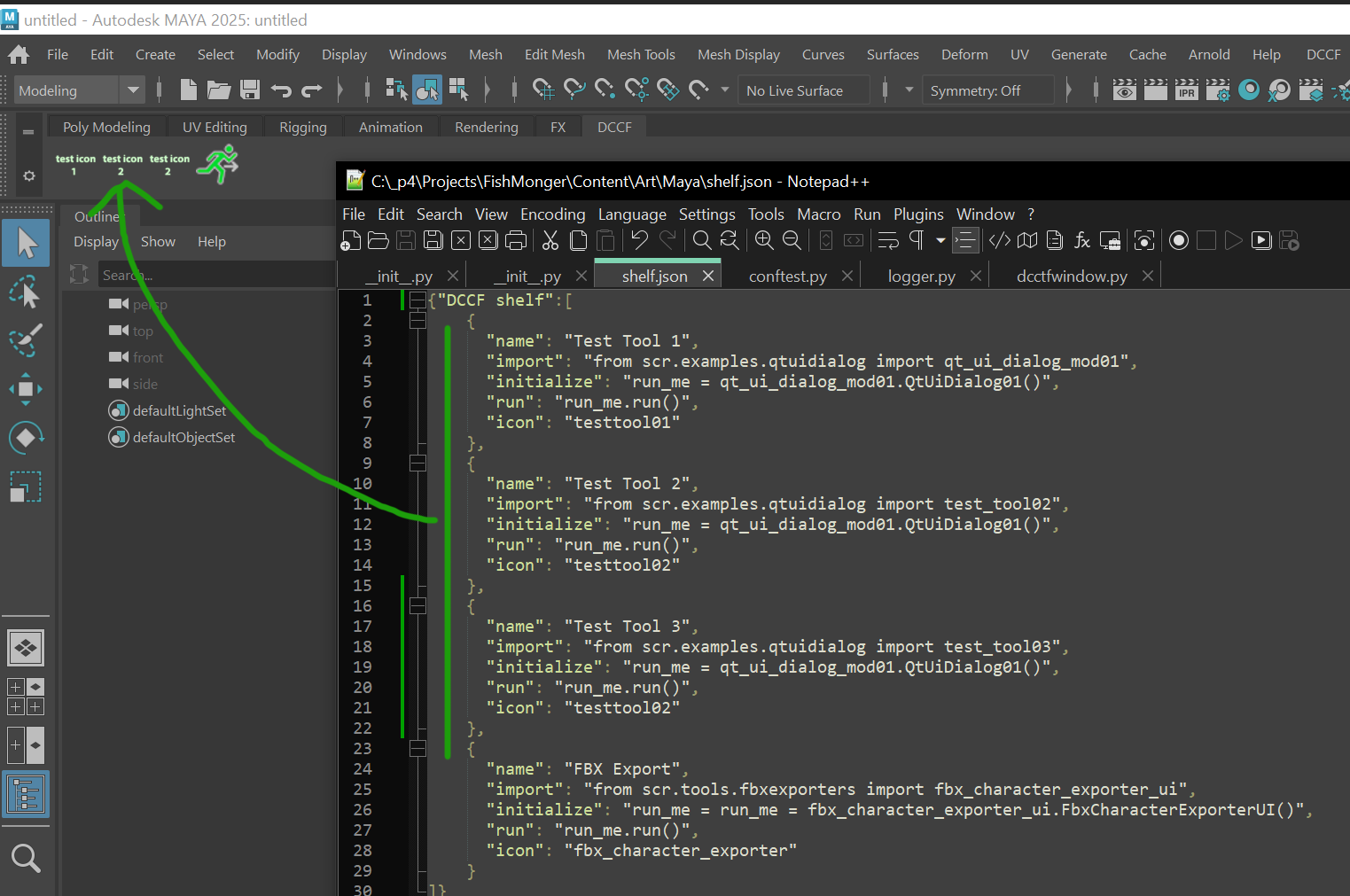
UI toolbar:
The Maya dccf toolbar drop-down is generated by python in the scr\framework folder

Logger:
Logging uses the standard library package logger so it is customizable for levels of severity and log output. It can be set in Debug options (see image above). Currently the log is written to the console and disk…depending on severity.
logger examples
<input>
import scr
logger = logging.getLogger(scr.logger_name)
<output>
<Logger DCCF (DEBUG)>
Get log level
<input>
scr.get_logger_level()
<output>
10
invoke error by dividing by 0
<input>
try:
   1/0
except Exception as Argument:
   logger.error(Argument)
<output>
 logger.error(Argument)
08-08-2024 18:59:41 - ERROR - line number: 5 - <maya console> - division by zero
# Error: DCCF : division by zero
Project data:
Project Data is loaded from <project_source_path>\Projects\FishMonger\project_data.xml (using ElementTree) into a python class Here is an example of how project data can be used to inform users of project news.

And use for project_data
<input>
from scr import project_data
print(project_data)
<output>
name : Fishmonger
source : P4
engine : Unreal 5
docs : https://drive.google.com/drive/folders/1HrKnj5hVkjeO9RsemKHD5GwrWMy_y4Td?usp=drive_link>
last_updated : 06/24/2024
author : Jonathan Paton
news : 06/24/2024
news description : The Big Kahuna has been added to the game and is ready for testing
vacation : 10/31/2024
vacation description : Halloween
<input>
project_data.docs
<output>
https://drive.google.com/drive/folders/1HrKnj5hVkjeO9RsemKHD5GwrWMy_y4Td?usp=drive_link>
Engine setup:
In order to get as much parity between DCC and engine the framework reads in, from project data, what engine you are using and sets up your DCC to get as much of a 1:1 relationship as possible. Currently just Unreal is hooked up and for that units are switched to centimeters, animation playback is set to 30 fps and grid size is set to match Unreal.
Project setup:
Any project specific setup that may be needed. There are just hooks for this now.
Unit test (WIP):
Unit tests use the pytest package and can be run from the Debug menu. I am currently implementing this and will probably run unit testing through a subprocess command and print to disk and console.